
How to nudge quiet HubSpot deals with n8n: An n8n Walk-Through
A 12-person practice adapts an n8n template so a quiet civic pursuit reaches its owner in Slack, keeps email visible, and records the outcome.
A deal follow-up nudge is a small workflow that checks whether a pursuit has moved, then gives its owner a clear next action. It matters when a proposal or interview follow-up sits in a CRM stage while the team assumes someone else is handling it.
The moment: a civic pursuit goes quiet after the interview
This is an illustrative scenario. A 12-person practice works across civic renovation, public libraries, and small education projects. It reaches a shortlist interview for a civic renovation. The team leaves the interview with a good feeling and a long list of project work.
Nobody follows up in the two weeks after. The deal remains in a HubSpot stage with no activity. The principal assumes the business-development lead sent a note. The business-development lead assumes the principal is waiting for the owner’s response. The pursuit has no shared next move.
The practice wants a quiet deal to create two visible actions. The pursuit owner should receive a Slack nudge. The contact should have a prepared follow-up email. The activity should be logged so the next review starts with a record instead of a memory.
That last part matters for a small team. A follow-up is easy to miss when the work lives in one inbox. A stage is easy to misread when it has no recent activity. The workflow gives the practice a repeatable check. A person still decides what to say and when the relationship needs a personal call.
How n8n handles it
The published template Send HubSpot deal follow-ups with Gmail, Slack, and Google Sheets uses six node types, HubSpot, Gmail, Slack, Google Sheets, If, and Wait. As published, it sends a timed sequence of follow-up emails to new HubSpot deal contacts, watches for replies, alerts Slack when there is engagement, logs outcomes in Sheets, and updates the deal stage.
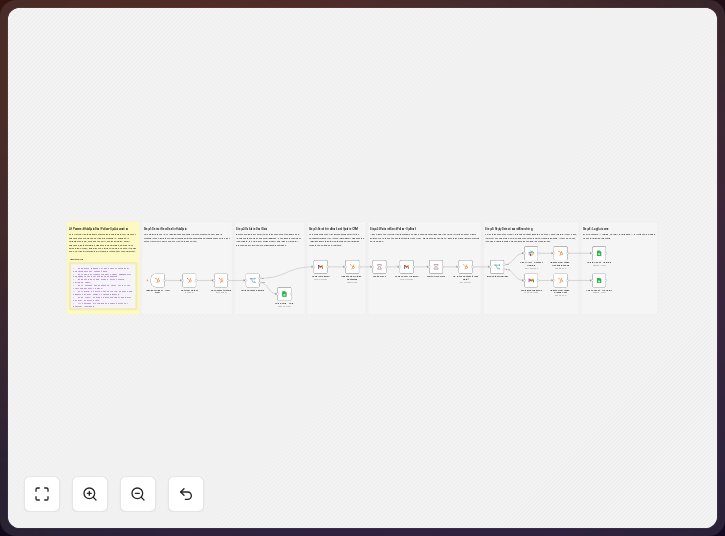
The practice changes the timing and message because its sales cycle needs weeks between checks, proposal and interview language, and stages that match its pipeline. The example maps Proposal Sent to No Response and Interview Scheduled, then adds the firm’s own closed or active stages; the practice can configure Gmail to create a draft for owner review before sending.
-
Select the HubSpot deal records that need a follow-up. Use the deal stage, owner, contact association, and recent activity fields. Start with pursuits in Proposal Sent or Interview Scheduled. Exclude closed deals and any record with a current human follow-up task. The source is the HubSpot deal record, not a separate memory list. A qualifying record can carry
dealstage: Proposal Sent,hubspot_owner_id, and an associated contact, so you can inspect the same fields before the first run. -
Set the waiting period for the practice’s pursuit rhythm. The published template uses Wait nodes as part of its timed sequence. Change each wait to the interval the team can support. A civic interview may need a longer pause than a direct sales lead. The owner should know when the next check will happen. For example, set the Wait node to
one weekafter the first proposal follow-up, then write that interval into the team’s review rule. -
Check for a reply or other engagement with an If node. The published template watches for replies before continuing its sequence. Map the reply check to the connected contact and the email thread. If there is a reply, stop the nudge path and route the outcome to the engagement branch. If there is no reply, continue to the owner alert and the next email action. The no-reply branch can test
{{ $json.reply_status }}equal tono_replybefore continuing, which gives you a condition you can inspect in a run. -
Notify the pursuit owner in Slack when the deal remains quiet. Include the project name, contact, current stage, last recorded activity, and the next action. Send the alert to the owner’s channel or to a small business-development channel. The point is ownership. A general alert without a named owner leaves the same gap in place. A usable message is: “Quiet pursuit: Civic Library Renovation. Stage: Proposal Sent. Owner: Maya. Next action: review the draft follow-up.” You can copy that shape and replace each field with the deal values.
-
Prepare the Gmail follow-up for review. Replace the published email copy with a short note about the civic renovation, the interview, and the next useful question. For this practice, the Gmail node can create a draft addressed to the contact. The owner reviews the tone and project details. If the firm’s policy permits automatic sending, the published send action can remain in place after the review rules are clear. The draft record should include
to,subject, andbody, with a subject such as “Civic Library Renovation follow-up” so you can review the intended recipient and message together. -
Log the result in Google Sheets. Record the deal, contact, stage, follow-up date, owner, reply state, and action taken. Keep one row for each workflow outcome. A reply, a draft awaiting review, and a continued no-response path should be distinguishable. The sheet is a review log. HubSpot remains the pipeline record. One row can read:
deal=Civic Library Renovation,stage=Proposal Sent,reply_state=no_reply,action=draft_created, giving you a compact review record. -
Update the HubSpot deal stage after the outcome is known. Move a quiet proposal to No Response only when that stage has a clear meaning for the practice. Move a responsive pursuit to the next human-reviewed stage. Do not let an automated stage change imply that an owner has accepted scope, fee, or schedule. A recorded transition can be
dealstage: Proposal Senttodealstage: No Response.
The template is a useful starting point for an n8n user who wants to open a working follow-up flow and change its fields, timing, copy, and recipients. n8n’s official documentation describes its node-based workflow actions and connected service credentials, while its Starter Cloud plan includes 2,500 workflow executions with unlimited steps, so you can compare the expected run count with the plan before launch.
The trick to using it well
Define quiet before building the nudge, because a stage alone is not enough and the practice needs a rule that combines stage, owner, contact, and recent activity. A deal can be quiet because the client asked for time, or because the team forgot to send the promised note, and those cases need different treatment.
Use the Slack message as an ownership check that answers who acts, which pursuit needs attention, and what the record says so far. It should not become a second pipeline; point the alert back to the HubSpot deal and the draft or email thread.
Keep the first email short and refer to the actual interview or submission, with an easy way for the recipient to respond. A generic sequence can make a good relationship feel like a campaign.
Give the owner a stop rule, with fields such as waiting, closed, do not contact, or handled by phone. The If branch should respect that field before another Wait node sends the record forward, and sensitive opportunities need a separate review rule.
What it delivers
For the illustrative practice, the quiet civic renovation deal remains in view. The owner receives a Slack message with the deal context. Gmail holds a reviewable follow-up draft. The team can change that choice to automatic sending when its approval rule allows it.
Google Sheets holds the follow-up outcome. The row can show that the practice prepared a message, recorded no reply, or received engagement. HubSpot keeps the deal stage and the relationship record. The systems have different jobs, so the team can tell where to review each question.
When the contact replies, the published workflow’s engagement path gives the team a signal to stop the sequence and act. The reply does not decide the pursuit. The owner reads it, updates the stage, and chooses the next conversation.
When there is still no reply, the team gets a visible reason to review the deal. It can send the approved note, make a call, ask a principal to step in, or close the pursuit. The workflow turns silence into a review item.
Where it fits, and where it doesn’t
n8n fits a practice that already keeps deals and owners in HubSpot and wants connected follow-up actions: HubSpot supplies deal context, Gmail handles email, Slack carries the owner alert, Google Sheets keeps an outcome log, and If and Wait control route and timing. For a private HubSpot app on the Free or Starter tier, the official API guide lists 250,000 requests per account per day, so you should check the integration’s call pattern before scaling it.
The firm must define its stages, activity fields, timing, email language, and approval rules. It must also keep credentials current and confirm that the right people can see deal and contact information.
The workflow does not know whether a client is frustrated, whether an interview went well, or whether a public owner expects a different form of contact. It does not replace a principal’s judgment. It cannot verify that a follow-up is appropriate. A person should review sensitive messages and any stage change that affects a pursuit decision.
Google Sheets is a useful log, but it is not the source of truth for the deal. Duplicate rows need review. A sheet can also expose contact information more broadly than the team intends. Set access deliberately. Keep the HubSpot record linked in each row.
The template’s published sequence is aimed at new deal contacts. An AEC practice may need a different start condition for a proposal, shortlist, interview, or negotiated contract. Test the field mapping against real pipeline states before enabling messages. Use a safe recipient or draft mode during that review.
The takeaway
The published n8n template connects HubSpot deals with Gmail, Slack, Google Sheets, If, and Wait nodes. A 12-person practice can adapt its timing, stages, message copy, and owner routing for a civic pursuit. The workflow creates a prompt and a record.
Common questions
Does the published template send email automatically?
Its published description says it sends a timed sequence of follow-up emails to new HubSpot deal contacts, and you can change the Gmail action to create a draft when an owner must review the note first.
What starts the follow-up path?
You should start it from a HubSpot deal with the required contact, owner, stage, and activity fields, while excluding closed deals and records that already have an active human follow-up.
How does the workflow know that a deal is quiet?
The If node checks the configured reply or engagement condition after a Wait node, while you define which stages and activity fields qualify; a quiet state should be a written rule, not a guess.
Why use Slack if HubSpot already has the deal?
HubSpot keeps the pipeline record, while Slack puts the owner prompt where the business-development team discusses current work; the message should link back to the deal and name the next action.
What should Google Sheets contain?
Use it for an outcome log with the deal, contact, owner, stage, follow-up date, reply state, and action taken, while keeping sensitive details limited to what the review needs.
Can the workflow choose the next deal stage?
It can update a configured HubSpot stage after an If branch, but you should define each stage clearly and require human review for changes that imply a pursuit decision or a client commitment.
Disclosure: DataDrivenAEC may earn a commission if you subscribe through links in this walk-through. Product behaviour is described from n8n GmbH’s documentation; the scenario is illustrative.
Related Insights
Published by DataDrivenAEC. Evidence basis: implementation provenance. This legacy article has not completed the source-and-edition review used for newer technical guides; verify important claims against their named sources.