
How to turn website inquiries into scored HubSpot pursuits with n8n: An n8n Walk-Through
A 9-person architecture practice adapts a published n8n template to capture website inquiries, score real pursuits, and alert the right principal.
Inquiry intake is the work of capturing a new request, deciding whether it fits the practice, and giving the next action to a named person. It matters when a shared inbox mixes serious project conversations with vendor messages and student questions.
The moment: a good inquiry waits in the inbox
This is an illustrative scenario. A 9-person architecture practice gets inquiries through a website form. Half are vendors and students. The real ones wait days in a shared inbox.
One inquiry is about a school addition. Another is from a developer planning a mixed-use study. Both have enough detail to deserve a response. Neither has a reliable owner when the inbox is busy.
The practice needs a short qualification path. It wants sector, budget band, and timeline in the form. It wants a score that reflects those fields. It wants the principal to hear about a scored lead without reading every submission first.
The form remains the front door, HubSpot becomes the contact record and pursuit home, and Slack carries the alert to the person who can act.
How n8n handles it
The published Typeform Lead Capture to HubSpot with Scoring and Slack Alerts template captures a Typeform submission, dedupes or updates the contact in HubSpot, scores the lead with custom logic, and alerts sales in Slack with the priority tier. Its five listed nodes are Typeform Trigger, If, HubSpot Search/Create/Update Contact, Function Lead Scoring, and Slack.
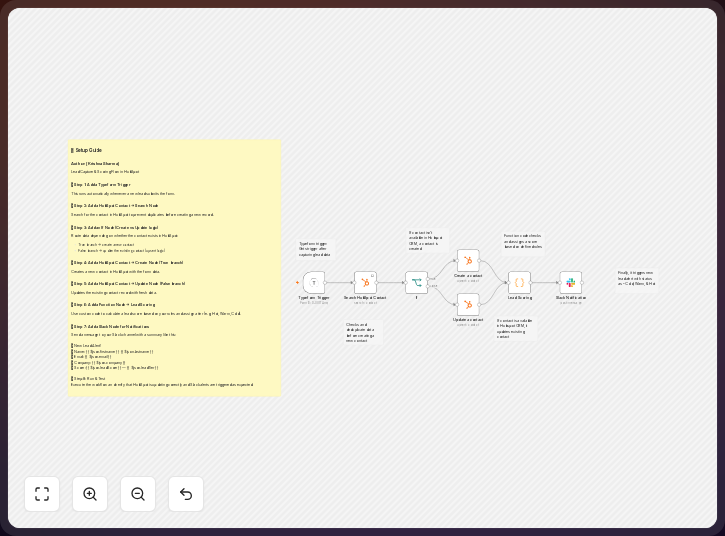
The practice changes the source fields and the business rules. The published template uses Typeform. The practice can connect its website inquiry form through Typeform, or map an authorized form source into the same fields. The contact logic stays in HubSpot. The scoring function becomes an AEC qualification rule.
-
Capture the website inquiry with the Typeform Trigger. Ask for the person’s name, email, firm, sector, project description, budget band, timeline, geography, and whether the request is an RFP or a direct hire. Keep vendor and student inquiries visible. Give them a clear category rather than sending them into the same pursuit queue.
Use fields such as
project_budget_range,delivery_method,is_rfp, andgeographyso the scoring step receives the AEC inputs named by the template map. -
Check the submission with the If node. Use it to separate an inquiry with the fields needed for review from one that needs clarification. The check can also distinguish a project request from a vendor or student message. Do not make the condition a hidden judgment. Write the rule where the practice can review it later.
A project branch can use the n8n condition
{{ $json.is_rfp }} = truewhen the form marks the inquiry as an RFP, with a separate branch for direct-hire requests. -
Find the contact in HubSpot before creating a new record. The published workflow searches for the contact and then creates or updates it. Map the form email to the contact identity. Store the sector, budget band, timeline, project type, geography, source, and inquiry text in properties that the practice can read from the record.
A sample contact record is
email: [email protected],project_type: school addition,project_budget_range: owner stated,delivery_method: CM at risk,is_rfp: true, andgeography: Denver. -
Score the inquiry in the Function node. Replace the published scoring logic with rules for the practice. A school addition can score well when the sector fits and the timeline is workable. A mixed-use study can score well when its budget band fits the practice’s minimum. A vendor request should not receive the same pursuit status. Keep the reasons with the score.
Keep the result as a record with fields such as
priority_tier: high,fit_score: high, andscore_reasons: school sector; CM at risk; Denverso the alert explains the result. -
Route the scored lead with Slack. Send the alert to the principal who covers the relevant sector or geography. Include the contact name, project type, budget band, timeline, score, and HubSpot link. Alert only when the score reaches the practice’s review threshold. Lower scoring inquiries can remain in HubSpot for later review.
A usable alert is: “New high-priority inquiry: [email protected], school addition, budget band
{budget_band}, CM at risk, Denver, score{fit_score}. Review in HubSpot:{hubspot_link}”.
The main setup work is in the form and the rules, so set source fields before connecting nodes, HubSpot properties before scoring them, and a named Slack recipient for each accepted sector.
n8n’s Starter plan includes 2,500 workflow executions per month, while its Pro plan includes 10,000, so you can compare expected inquiry volume with the plan’s allowance before launch. HubSpot’s official sending guidance sets a free-account limit of 500 emails per day, which matters if you later add email follow-up beside the Slack alert.
The n8n template gives the practice a published starting point for this path. n8n’s official documentation describes the node-based workflow model and connected actions.
The trick to using it well
Agree on the scoring rules in a short working session with the people who answer inquiries, because you need to explain every score when a principal reviews it.
Start with the fields that affect the first response: sector tells you whether the work fits, budget band sets an early boundary, and timeline shows whether the inquiry needs a prompt call or can wait for review.
Keep vendor and student submissions in a separate category; they may still help the practice, but they should not crowd the principal’s alert stream.
Use the If node for simple gates and the Function node for the score and its reasons, which makes each rule easier to change when the practice’s work mix changes.
Review the score against real responses; if a promising owner inquiry receives a low score, change the rule, and if a weak fit reaches the principal, tighten the condition.
What it delivers
For the illustrative practice, a website inquiry starts as a Typeform submission. n8n checks the submission and passes its contact details into HubSpot. An existing contact is updated. A new contact is created when no matching record is found.
The HubSpot record holds the information needed for a first review, including the sector, project description, budget band, timeline, source, qualification score, and score reason.
The school addition and mixed-use study can reach the right person through Slack, with enough context to open HubSpot and call, request more information, or assign a follow-up.
The workflow also reduces duplicate contacts. A returning client who submits another inquiry can update an existing HubSpot contact instead of starting a second record. The practice still needs a clear way to associate a new inquiry with a deal or pursuit.
Where it fits, and where it doesn’t
n8n fits a practice that has a website form, a HubSpot account, and a clear person to receive qualified inquiries; the published template already connects the trigger, contact path, custom scoring, and Slack alert.
The practice must define its accepted sectors, budget bands, timelines, geography, and RFP rules. It must also maintain the form fields when its services change.
The workflow does not verify that an inquiry is complete or permissible to pursue, decide whether the practice has capacity, or replace your review of the client, scope, fee, and procurement conditions.
The published template is built around Typeform, so a different website form needs a supported connection or a mapping step that produces the expected fields.
Slack is an alert channel, not the pursuit record; keep the contact, inquiry details, owner, stage, and follow-up in HubSpot while you maintain pipeline stages that match your business-development process.
The takeaway
The published n8n template gives a 9-person practice a direct path from a website inquiry to a HubSpot contact and a Slack alert. The practice changes the form fields and score so sector, budget band, and timeline shape the first response. A named owner can then act while the inquiry still has momentum.
Common questions
Does the template start with a website form?
The published template starts with a Typeform Trigger, so you can use Typeform for the website inquiry form or connect an authorized source that supplies the same intake data.
Does it create a new HubSpot contact for every inquiry?
No. The published description says that it dedupes and updates the contact in HubSpot, so use email as the identity field and decide how a new inquiry links to a pursuit or deal.
What should the AEC score measure?
Start with sector, budget band, and timeline for this scenario; add geography or procurement type when those rules affect who can respond, and keep the reasons beside the score so you can explain the alert.
Can vendor and student messages stay out of Slack?
Yes. Use the If node to separate them from project inquiries, store them in HubSpot when they have future value, and alert the principal only when the score reaches your review threshold.
Who should receive the alert?
Route it to the principal who covers the relevant sector or geography, include enough context for a quick decision, and use a shared channel only when ownership stays visible there.
Disclosure: DataDrivenAEC may earn a commission if you subscribe through links in this walk-through. Product behaviour is described from n8n GmbH’s documentation; the scenario is illustrative.
Related Insights
Published by DataDrivenAEC. Evidence basis: implementation provenance. This legacy article has not completed the source-and-edition review used for newer technical guides; verify important claims against their named sources.