
How to Monitor RFPs Automatically: An n8n Walk-Through Built on a Published Template
A 16-person architecture practice adapts a published n8n RSS workflow to screen procurement notices, save opportunities, and alert its BD lead.
RFP monitoring is the regular work of finding opportunity notices, checking their fit, and giving the right person enough information to decide. It matters when a business-development lead must check several sources while also keeping current pursuits moving.
The moment: a procurement notice arrives after the weekly meeting
This is an illustrative scenario. A 16-person architecture practice works across civic, education, and housing projects. Its BD lead reads a procurement portal and keeps a short list of possible pursuits. A new civic renovation notice appears after the weekly meeting.
The notice has a location and services that might fit, but the deadline needs a quick check before anyone treats it as a pursuit. Without a shared path, the link stays in a browser tab, the principal hears about it later, and the team loses time deciding whether it belongs in the pipeline.
There is a separate boundary for DataDrivenAEC’s Opportunity Radar. Radar is a report and a map, not a feed. It has no public RSS, CSV, JSON, or API export. A person reads it and decides. This automation starts from a source that exposes a feed, such as a procurement portal RSS feed. It does not create a Radar integration.
How n8n handles it
The published template Smart RSS feed monitoring with AI filtering, Baserow storage and Slack alerts polls RSS feeds, filters items already seen or off topic, posts new qualifying items to Slack, and logs them in Baserow. Its published record contains 8 nodes, covering HTTP Request, XML, Baserow, Code, an AI Agent, Simple Memory, Structured Output Parser, and Slack.
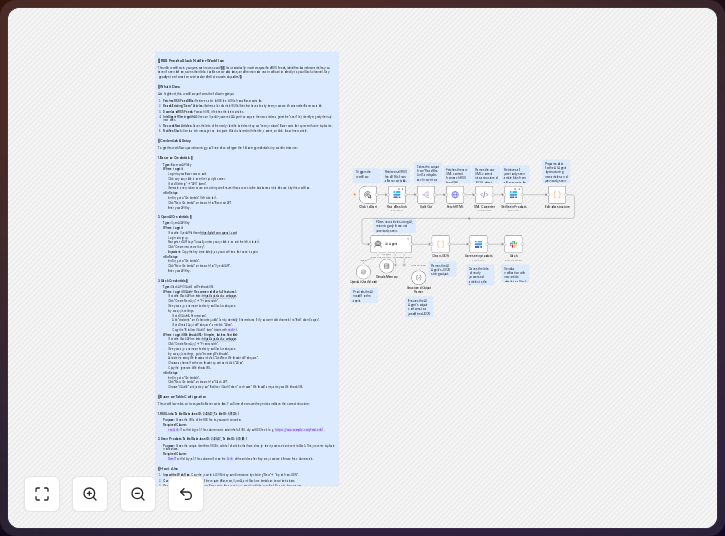
The practice changes the sources and fields while keeping the Baserow record or using a HubSpot deal. The AI filter is optional, since a plain IF node can check the rules directly.
-
Read the procurement portal RSS feed with an RSS Feed Read node. Keep the source fields
title,link,summary, andpubDatewhen the feed supplies them. The source must be authorized for this use. -
Check geography, service, and deadline with an IF node. A service check can use
{{ $json.title }}and test whether it containsrenovation, while the practice adds its geography and deadline conditions beside it. The plain IF node then checks those stated conditions instead of asking the optional filter to judge them. -
Filter repeats and uncertain matches. The published template uses Code, Simple Memory, and its AI Agent with an OpenAI Chat Model to identify items already seen or off topic, so you can keep that section when source wording varies. Change the prompt to score discipline, geography, and project size, or compare the source URL with earlier records for a simpler path. Unclear matches go to review, with
linkretained as the duplicate check value. -
Record the qualifying notice in Baserow, as the published template does. A sample record has
title,location,service,deadline,link, andmatch_reasonfields, and Baserow Cloud allows files up to 100 MB in a File field when the workflow later needs an attachment. If the practice wants the opportunity in its sales pipeline, use the HubSpot node to create a deal instead, but keep the original notice visible before accepting it. -
Alert the BD lead in Slack with
New opportunity: Civic renovation | deadline: {deadline} | source: {link} | record: {record_link}after logging the item in Baserow. The BD lead reads the alert and decides whether to assign the pursuit, ask for a quick fit check, or close it; n8n’s Starter plan includes 2,500 workflow executions per month, so a daily feed check leaves room for other automations.
The template is a useful starting point for n8n users who want to open the published workflow and adjust its source, checks, record fields, and recipient. n8n’s official documentation describes the platform’s nodes and connected actions.
Continue to the governed n8n technology record for the official vendor source, documented limitations, alternatives, and separately disclosed commercial destination where eligible.
The trick to using it well
Write the qualification rules before connecting the feed, with a defined geography, service words that match the practice’s language, and a review state for incomplete deadlines.
Keep the original link and the reason for the alert beside every notice, so you can see why an item passed without reconstructing the workflow.
The optional AI filter is useful when titles and summaries use inconsistent language. It should not replace the practice’s basic rules. Start with the plain IF checks. Add the other filter when repeated wording creates too many false matches.
Do not treat a feed item as a pursuit decision: the workflow routes a notice, while the BD lead checks the solicitation, confirms eligibility, and assigns the next action. Deadlines can change after the first notice, and a service keyword can look right while the actual scope is wrong.
What it delivers
For the illustrative practice, a qualifying civic notice becomes a shared opportunity record. It has the source title and link. It has the location, service check, and deadline state. Baserow keeps the published template’s log. HubSpot is an available alternative when the firm wants a deal record.
The workflow also gives the BD lead a reason for the alert, whether a notice passed because its geography and service matched or stopped outside the firm’s area. A missing deadline can wait for review instead of being guessed.
Slack makes the next human action visible. The BD lead can open the original notice, assign a reviewer, or close the item. The workflow handles repeated intake. The practice keeps the decision.
Where it fits, and where it doesn’t
n8n fits a practice with an authorized RSS source and a need to connect intake, conditions, storage, and notification; the published template already shows that shape through its Baserow log and Slack alert.
The firm still decides which sources it may use. It still checks whether a notice is complete. The architect still decides on duplicate handling, deadline review, eligibility, and the go or no-go decision.
Radar does not provide the starting feed. It is a report and a map for a person to read. It has no public RSS, CSV, JSON, or API export. Use a procurement portal feed or another authorized source for the first node. Keep Radar as a separate human research step.
Baserow is a record store in the published template. It is not the full pursuit process. A HubSpot deal can hold the opportunity when that matches the firm’s pipeline. Neither record removes the need for solicitation documents, a proposal calendar, an owner, or a review conversation.
Download the synthetic review sandboxes
Imported and executed in n8n 2.38.7 on September 11, 2026, with outputs matching the Node implementation. These original DataDrivenAEC files are separate from the third-party RSS template described above. They prepare review records from synthetic structured inputs; they do not poll a feed, verify a notice, write to a CRM or send an alert.
Start with the setup, scope and import-test instructions. The package includes an RFP notice-review sandbox, an RFI/submittal filing-proposal sandbox, and a structured meeting-action sandbox. The meeting task takes already structured actions, not an unprocessed transcript.
The shared executable source keeps missing owners and dates on hold, separates amendments from duplicate records, and requires human approval. Each workflow starts inactive, uses no credentials and has no external-action nodes. Read the artifact license; it does not cover third-party notices or documents.
Run the synthetic inputs in an authorized test environment before adding any live adapter. The supplied samples passed the n8n importer and JavaScript task runner with default sandbox restrictions and no network access. That verifies the synthetic transformations, not durable external storage or exactly-once notifications. The connected workflow above therefore remains documented, not production-tested.
The takeaway
The published n8n template gives a clear path from feed intake to storage and Slack notification. A 16-person practice can replace its sources and use direct IF checks for geography, service, and deadline. The useful boundary is simple: automation routes candidates, while the BD lead owns the pursuit decision.
Common questions
Does the published template monitor procurement portals?
The published description says that it polls RSS feeds, filters new qualifying items, logs them in Baserow, and posts them to Slack. You change those feeds to an authorized procurement-portal RSS source.
Does the workflow connect to Opportunity Radar?
No. Radar is a report and a map, not a feed. It has no public RSS, CSV, JSON, or API export. A person reads it and decides. The automation starts from a source that exposes a feed.
Is the AI filter required?
No. You can use a plain IF node for geography, service, and deadline, while the published AI Agent section remains optional when source language varies or a broader topic check helps.
Where should the opportunity be stored?
Baserow is the published choice, while a HubSpot deal is an alternative when your firm’s BD pipeline already uses HubSpot. Keep the source URL and rule reason in either record.
Who receives the Slack message?
The BD lead should receive it in the practice’s BD channel. The alert should contain enough context to open the source and decide the next human action.
Disclosure: DataDrivenAEC may earn a commission if you follow an eligible, disclosed commercial link from the linked n8n technology record. Product behaviour is described from n8n GmbH’s documentation; the scenario is illustrative.
Related Insights
Published by DataDrivenAEC. Evidence basis: vendor documented. Review status: approved.