
How to turn approved project billing detail into QuickBooks invoices with n8n: An n8n Walk-Through
A five-person practice collects approved hours and reimbursables once per project, checks client details, and prepares QuickBooks invoices for review.
Monthly billing is the work of turning approved time and reimbursable costs into a client invoice. It matters when a principal has to collect the same project details from separate sources before an invoice can leave the office. A single intake point can make the handoff easier to review.
The moment: the first two days of the month
This is an illustrative scenario. A 5-person architecture practice bills six projects monthly. The principal spends the first two days of each month assembling approved hours and reimbursables from three places. One source has time. Another has receipts. A third has the client contact and project code.
The practice does not need another place to retype every detail; it needs one billing request per project that gathers the client information, approved time, reimbursables, project identifier, billing period, and fee phase before the principal sees anything sent to the client.
The failure this prevents is easy to recognize: a project invoice can use an old address, a receipt can sit outside the billing packet, or a phase can differ from the fee agreement, forcing the principal to correct the invoice or ask the client for details the practice already had.
The firm changes the published workflow around its own approval point, so hours and reimbursables are approved first, the billing form collects the detail once, and QuickBooks receives customer and invoice information after the principal reviews the submission.
How n8n handles it
The published n8n template Client billing detail collection & invoice generation with Gmail and QuickBooks emails a client to collect missing billing details through a hosted form. As published, it uses Gmail, QuickBooks Online, Form Trigger (Enter Client Details), Form Trigger (Collect Info), QuickBooks (Find/Create Client), and QuickBooks (Create Invoice) nodes. It then finds or creates the client in QuickBooks and generates and sends the invoice.
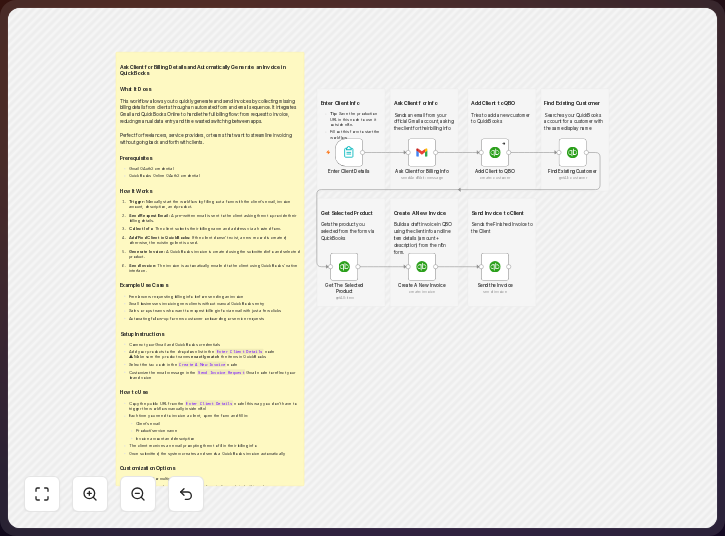
The practice changes the source, fields, routing, and recipients: an approved monthly billing packet replaces the general request, the fields describe project billable detail, and routing adds principal review before delivery to the project contact and internal billing reviewer.
The template record lists six nodes. That count gives you a useful starting estimate for review, although the firm’s added approval route will require more configuration.
-
Start the request from the approved billing cutoff. Use the published form triggers as the intake point after the principal has approved the month’s hours and reimbursables for a project. The first form can collect the client and project details. The second can collect the billable lines. If the practice uses a time and materials cutoff, keep that approval outside the form and pass only approved values into the request. Include the field
billing_periodso each submission identifies the month it covers. -
Collect fields that explain each invoice line. Add project name, project code, billing period, fee phase, approved hours, hourly or phase rate, reimbursable description, reimbursable amount, and supporting receipt reference, using a separate line for reimbursables when accounting requires it. The form should also ask for the billing contact, email address, billing address, and purchase order reference when the client uses one; a billable line can carry
project_code,fee_phase,approved_hours, andhourly_ratetogether. -
Email the request and the review result through Gmail. The published template uses Gmail to email a client for missing billing details. In this practice, Gmail can send the hosted form link to the project contact and can send the completed billing summary to the principal. Keep the internal review message separate from the client message. The reviewer needs the project code, approved values, and source references. The client needs the information the practice has chosen to request. Use a review message such as: “Billing review:
{project_code},{billing_period},{fee_phase}, approved amount{amount}. Source:{receipt_reference}.” -
Find or create the client in QuickBooks Online. The published workflow uses a QuickBooks node for this step, so match on a stable customer identity agreed by the practice and review a possible match before creating a new record. Do not let a spelling change create a second customer when the invoice belongs to an existing project relationship; retain
DisplayName,PrimaryEmailAddr, andBillAddrfor comparison with the form. -
Map the approved detail to invoice lines. Use the firm’s phase based billing structure, such as SD, DD, CD, or CA, when those labels match the fee agreement. Keep the project code and billing period visible in the line description or the available project field. Map approved hours and reimbursables only. Do not turn a draft estimate or an unapproved receipt into a billable line. A line description can read
PROJECT-ALPHA | 2026-08 | DD | 18 approved hours. -
Review the generated invoice before it goes out. The published template includes QuickBooks (Create Invoice) and says the invoice is generated and sent, while the practice should place its principal or accounting reviewer between creation and delivery when its process requires that check. Confirm the customer, project, fee phase, amounts, tax treatment, supporting references, and recipient, then send from the approved accounting process after the review record shows
CustomerRef,TxnDate,DueDate, andLine.
n8n’s pricing page lists 2,500 workflow executions for its Starter plan, so you should compare that monthly ceiling with the firm’s billing volume before choosing Cloud.
The practice should confirm the current node fields and account permissions before using the template in production. Learn more about n8n and QuickBooks Online, both from the vendors.
The trick to using it well
The non-obvious discipline is to separate approval from collection: use the form to gather a clean billing packet, while the principal decides whether time or costs are billable before the request starts.
Give every project one stable identifier and use it in the form, invoice line description, receipt reference, and internal review message, because project names can change and clients can have similar names.
Set a rule for missing detail: return a missing billing address to the client, return a missing receipt to the project team, and stop the invoice for a missing fee phase until you resolve it rather than filling the gap with a guess.
Keep the monthly packet small enough to read by grouping approved hours by the client’s fee phase and keeping separately supported reimbursables distinct, so you can compare the invoice with its approved source without opening every email thread.
Use the client’s email only for the request and final approved invoice, while internal questions stay in the practice’s review channel or accounting process so an internal note does not reach the wrong recipient.
What it delivers
For the illustrative practice, each monthly project packet produces a consistent billing request. It contains the client and project identity. It contains approved hours and reimbursables. It points to the supporting references needed for review.
The workflow also gives the practice a QuickBooks customer decision. An existing client can be found and reused. A new client can be created when the match rules and reviewer support that action. That reduces duplicate customer records, but it does not remove the need to check the match.
The final output is a QuickBooks invoice with lines that reflect the firm’s fee phases and approved costs. The principal can review the customer, project, descriptions, amounts, and recipient before the invoice goes out. The accounting record can then support invoice and payment tracking.
The useful result is a repeatable handoff. The principal no longer has to assemble the same details from three places at the last moment. The firm still owns the approval and the client relationship.
Where it fits, and where it doesn’t
n8n fits a practice that needs to connect a hosted form, email, and QuickBooks Online. The published template already shows that path. It gives the firm a starting point for collecting missing client details, checking or creating a QuickBooks customer, and creating an invoice.
This is a configurable billing workflow. It is not an AEC fee-management system. You still need a source of approved hours, an approved reimbursables process, fee agreement rules, and a person who can resolve exceptions; the architect or principal decides what is billable and which exceptions need resolution.
QuickBooks Online can hold accounting records and financial reports. Its project and labor features vary by subscription. An accounting report does not replace fee forecasting, earned value management, quantity takeoff, or construction cost control. The project team should keep those controls in the system designed for them.
Financial integrations also need safeguards. Use authorized credentials. Control who can change customer and invoice data. Reconcile the generated invoice with the approved packet. Watch for duplicate submissions. Keep an exception path for a failed lookup, an incomplete form, or an invoice that needs correction.
The published template says it generates and sends the invoice. A practice that requires principal review should change the routing so creation and delivery are separate decisions. That is a process choice for the firm. It should be written into the workflow and the accounting policy.
The takeaway
A published n8n template can give a 5-person practice one path from approved billing detail to a QuickBooks invoice. The firm changes the form fields, project mapping, approval route, and recipients to match its fee process. The automation handles the handoff while the principal keeps control of what is billable and what the client receives.
Common questions
Does the published template collect time and reimbursables?
Its published description says it emails a client to collect missing billing details through a hosted form, then finds or creates the client in QuickBooks and generates and sends the invoice. The practice adapts the forms to collect its approved hours and reimbursable lines.
Should the client approve the hours in the form?
That depends on the fee agreement. In this walkthrough, the practice approves the hours and reimbursables before opening the billing request. The client form collects billing detail. It does not replace the firm’s internal approval.
What should you put in the form for each project?
Collect the project identity, billing period, fee phase, approved hours, rate or phase amount, and reimbursable support, then add the billing contact, address, and purchase order reference when the client requires one.
How should you handle an existing client in QuickBooks?
Use the published Find/Create Client step with a stable matching rule, review a possible match before creating a record, and resolve uncertainty instead of relying on a name alone.
Can the invoice be sent automatically?
The published template says the invoice is generated and sent. A practice can keep that behavior when its controls allow it. If the principal must review first, add a review stage between invoice creation and delivery.
Does this replace project accounting?
No. It creates an invoice from approved billing detail, while QuickBooks tracks project income, expenses, invoices, and payments where your selected plan supports those features. Keep the fee forecast, time approval, expense review, and reconciliation process alongside it.
Disclosure: DataDrivenAEC may earn a commission if you subscribe through links in this walk-through. Product behaviour is described from n8n GmbH and Intuit documentation; the scenario is illustrative.
Related Insights
Published by DataDrivenAEC. Evidence basis: implementation provenance. This legacy article has not completed the source-and-edition review used for newer technical guides; verify important claims against their named sources.