
How to Log Site Photo Reports with n8n: An n8n Walk-Through
A six-person architecture practice adapts a published n8n template so a site photo and short field note become a dated project record and lead alert.
A site observation workflow turns a field note into a shared project record while the useful details are still close to the observation. A photo, location, and short note can tell the project lead what needs attention before memory fills in the gaps.
The moment: the photo that stays on the phone
This is an illustrative scenario. A 6-person architecture practice has one architect visiting a housing site twice a week. The architect takes photos on a phone and sends occasional messages to the project lead. The field report is written days later from memory.
The gap is easy to miss because a photo can show a blocked service route or a material that does not match the drawing while the context remains in the architect’s head. By the time the report is written, the exact date and location can be uncertain, and the project lead sees the issue after the useful handoff window.
The practice wants a low-friction habit, so the architect sends a photo plus a one-line Telegram note naming the project and location. The workflow places the report in the project’s Google Sheet with a timestamp and completion status, then sends the project lead a Telegram notification so the observation is visible the same day.
The record is small on purpose, with enough detail to identify the issue, preserve the image, and decide whether a fuller site report or task is needed.
How n8n handles it
The published template Manage construction projects with tasks, photo reports, Telegram and Google Sheets helps project managers collect task updates and photo reports from field workers through Telegram and store them in a Google Sheet. Its published nodes are Cron, Google Sheets, If, and Telegram. As published, workers receive daily tasks in Telegram, respond with photo reports, and the bot saves photos and status with timestamps in the sheet while keeping report history.
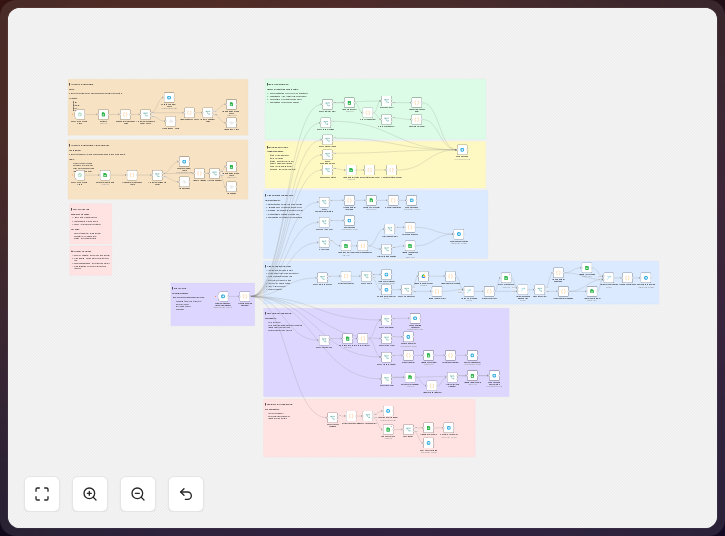
The practice changes the source details and record shape while keeping Telegram for field input, Google Sheets as the project log, and the If node to separate usable observations from incomplete messages. It routes accepted reports to the project lead through Telegram, with project names, locations, row fields, and chat recipients set by the practice. The template has four published nodes, so you can inspect each handoff before adding project-specific logic.
-
Set the source to the firm’s Telegram bot and field-report chat, keeping the published task prompt if the team wants a daily request for updates. For this practice, ask for one photo and one short note that includes the project name and site location, with the concrete input formatted as a Telegram photo report containing
photoandstatus. A photo from a phone is the working input, not a later upload from a desktop. -
Capture the fields that make the observation useful by keeping the Telegram message, photo reference, project name, site location, observation date, sender, and completion status. Add a short issue type only if the team can use it consistently, since a narrow set of columns is easier to complete in the field. The published template depends on a connected Google Sheet with specific headers and preconfigured tasks, so write those headers before changing the workflow; a sample row is
photo,status, and the report timestamp. -
Check whether the reply has the minimum information, using the If node to send incomplete replies back for correction or review. A message without a project name should not become an unowned row, and a photo without a location can wait for clarification before a complete reply moves to the sheet. This routing rule separates a Telegram reply with
photoandstatusfrom an incomplete report; it does not judge the construction issue. -
Log the accepted report in the project sheet by mapping each Telegram response to one row, storing the photo reference beside the one-line note, and recording the workflow date and time. Keep task completion status separate from observation text so the sheet becomes a chronological project log that the lead can sort by project or visit date without asking the architect to reconstruct the visit. The record includes
photo,status, and a timestamp. -
Notify the project lead in Telegram after the row is written, sending the project name, location, note, date, and link or reference to the photo. Use one recipient for each project or a defined project group; a sample message is “Oak House, north stair: blocked service route, photo attached, 2026-08-25.”
-
Review the daily task and report history at the agreed project check-in, using the Cron node to keep the task prompt on schedule and the sheet to show whether the expected update arrived. A missing update should prompt a human question rather than serve as proof that no site issue exists; review the
statusvalue beside the report timestamp and photo reference.
For a small practice, n8n Cloud’s Starter plan includes 2,500 workflow executions per month, so estimate daily prompts and photo reports before choosing a plan. Telegram’s Bot API limits file downloads to 20 MB, which makes a phone-compressed site image a safer input than an uncompressed video or drawing set.
The template gives an n8n user a starting workflow with the main pieces already named. Learn more about n8n and open the published template before setting credentials, chat IDs, and sheet headers.
The trick to using it well
The non-obvious discipline is to separate an observation from its follow-up: your first message records what you saw, while the project lead decides whether it needs a task, consultant question, or fuller record rather than treating it as a closed punch-list item or formal site report.
Keep the field message short enough to send while standing at the site, using the project name, location, and one sentence about what you saw. The photo should show the condition clearly; if you need a wider view, send another image as a separate report or use a defined multiple-photo rule.
Use project names from a controlled list because a row called “Oak House”, “Oak housing”, or “OH” can split one project’s history across several filters. Keep a project code in the Telegram prompt and sheet, then decide who corrects a mistaken project before the log becomes a second source of confusion.
The If branch needs a clear response: send incomplete reports back to the architect with the missing field named, accepted reports to the sheet and lead, and failures to a visible review path. A silent failure is worse than a short delay because the team may assume the row exists.
Protect the photo record by deciding who can view the Telegram chat and Google Sheet, avoiding client or occupant information unless project rules permit it, and setting retention rules for images and old rows. Construction records can become part of a later disagreement, so keep the original wording and date available.
What it delivers
For the illustrative practice, the workflow produces a dated row in the housing project’s log after a field visit. The row contains the project, location, photo reference, short observation, sender, and completion status. It keeps the report tied to the day it was sent instead of the day someone remembers writing it.
The project lead receives a Telegram message with the same core context. The lead can open the photo, understand its location, and decide what should happen next. The alert invites review. It does not claim that the issue is resolved.
The sheet also preserves report history. Over time, the team can see whether a condition was recorded before a later change. It can compare the observation with the next site visit. It can find reports that still need a formal action.
The Cron node supports the repeatable task prompt in the published template. The practice can use that prompt to ask for a site update before a planned visit or at a regular reporting point. The report still comes from the person at the site. The schedule creates the reminder.
The If node gives the log a basic quality gate. A report with no project or location can wait for correction. A usable report can move forward. That small distinction makes the sheet more useful without pretending that a routing rule understands construction quality.
Where it fits, and where it doesn’t
n8n fits a practice that wants a light field-report path using a Telegram bot and Google Sheets. The published template is already construction-focused. It covers task prompts, photo replies, sheet storage, timestamps, completion status, and report history. The firm changes the fields and the recipient logic to fit its projects.
This is not a full construction management system. Google Sheets does not replace the contract record, formal observation report, request for information process, submittal log, or punch-list tool. Telegram does not prove that a project lead reviewed an issue. The architect still decides what the observation means and what formal action follows. The practice still needs an owner, a response date, and a project process for decisions.
The template expects a connected sheet with the right headers and preconfigured tasks. Those parts need maintenance. Project names and staff change. A bot can remain connected while row mapping becomes wrong. Review the first reports against the intended columns and keep the sheet simple.
A photo can contain personal information, confidential drawings, or details that should not travel through a group chat. Confirm the firm’s privacy rules and client obligations. Limit bot access. Use a separate chat for each project when that reduces accidental disclosure. Keep the formal project archive in the approved system.
Finally, a phone workflow depends on coverage and attention. A field worker may be unable to send a report at the right moment. The Cron reminder cannot fill that gap. The project lead should know how to record a missed update and how to escalate a safety concern outside this workflow.
The takeaway
The published n8n template gives a path from Telegram photo reports to a Google Sheet with timestamps and status. A 6-person practice can adapt its fields so project and location travel with the observation. A Telegram alert can make the same-day handoff visible, while the project lead remains responsible for review.
Common questions
Does the published template already support photo reports?
Yes. Its published description says field workers respond to daily Telegram tasks with photo reports. The bot saves photos and status to a Google Sheet, with timestamps and report history.
Can the architect send a note with the photo?
That is the useful practice change. The firm should define a short message format with the project name and location. The If node can check for the minimum fields before the row is accepted.
Is the Google Sheet a punch-list?
No. It is a project log for observations and task status. A project lead can create or update a punch-list item after review. The formal action belongs in the firm’s approved project system.
Will the project lead receive an alert automatically?
Before you use it for daily reporting, choose the chat and message fields, confirm the expected photo size, and decide who reviews an incomplete report.
What should happen to an incomplete report?
Route it to correction or a review queue. Do not write an unowned row and assume someone will repair it later. The minimum check can require a project name, location, photo, and short note.
Can this replace a formal site report?
No. It creates a timely record that can support the formal report. It does not make professional findings, confirm compliance, or close a construction issue.
Disclosure: DataDrivenAEC may earn a commission if you subscribe through links in this walk-through. Product behaviour is described from n8n GmbH’s documentation; the scenario is illustrative.
Related Insights
Published by DataDrivenAEC. Evidence basis: implementation provenance. This legacy article has not completed the source-and-edition review used for newer technical guides; verify important claims against their named sources.