
How to turn meeting transcripts into ClickUp tasks with n8n: An n8n Walk-Through
A 14-person practice turns weekly OAC transcripts into a project summary in Slack and owned ClickUp actions with due dates.
Meeting action capture is the work of turning spoken decisions into a shared record with an owner and a next date. It matters when a project team leaves an OAC meeting with clear intent, then loses the detail inside a transcript, an inbox, or someone’s memory.
The template connects a Fireflies transcript to a summary, a structured action list, a Slack message, and ClickUp tasks through seven nodes: Webhook, Fireflies, Code, Google Gemini, Code, Slack, and ClickUp.
The moment: the OAC action that disappears by Thursday
This is an illustrative scenario. A 14-person practice runs weekly OAC meetings on a school project. The architect, structural engineer, contractor, and owner agree on actions out loud. Someone records the meeting with Fireflies. By Thursday, the transcript exists, but the project team is still asking who owns the roof detail and when the response is due.
The failure is a handoff problem because useful meeting information does not reach the project list in a form that a person can review. The project manager must reread the transcript, write a summary, decide which sentences are actions, and create tasks one by one, so that work waits behind site questions and submittal reviews.
The target state is narrower: Fireflies finishes the transcript, n8n receives the event, and the meeting text goes through the published workflow before a summary reaches the project Slack channel and each extracted action becomes a ClickUp task with its responsible person and due date.
How n8n handles it
The published template Fireflies transcripts to meeting summaries and task extractor to Slack and ClickUp starts with a Webhook when Fireflies finishes transcribing a call. It retrieves the transcript through Fireflies. Code nodes split and assemble the text. Google Gemini creates a short summary and structured action items. Later Code processing formats the response and maps actions to titles and descriptions. Slack receives the summary. ClickUp receives the action items as tasks.
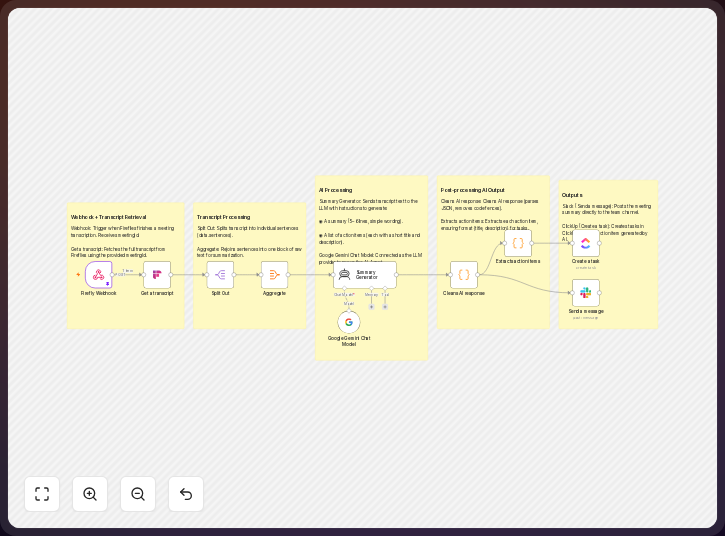
The firm changes the project source details, action fields, ClickUp destination, and Slack recipient while the published seven-node sequence remains the base.
-
Receive the completion event from Fireflies through the Webhook node. Connect the Fireflies account with the API access required by the published template. Keep the meeting identifier in the incoming record so the workflow can retrieve the finished transcript. The incoming record should retain a field such as
meetingId. -
Retrieve the transcript from Fireflies. Keep the meeting title and date with the transcript text. Add the project code or project name at this point if Fireflies supplies it. A usable record has
title,date, andtranscripttogether. If the recording covers several projects, use an agreed naming rule or a review field rather than guessing the destination. -
Prepare the text in the first Code node. The published workflow splits the transcript into sentences and aggregates them into a raw text block, giving the summarization step a consistent input; for the school project, preserve speaker names when they identify the discipline or responsible party before passing the assembled value as
transcriptto the next node. -
Extract a concise summary and action items with the Google Gemini node. The published template asks for a short summary and a structured list of actions. Change the instruction so an action includes a task title, a useful description, an owner, and a due date when the meeting states one. Tell the workflow to leave the owner or date blank when the transcript does not support it. Each action should return
title,description,owner, anddueDate. -
Format the response in the second Code node, which cleans the response, formats it as JSON, and maps action items into titles and descriptions. Add the project name, meeting date, source meeting link, owner, and due date as separate fields, then keep the original action wording in the description so the project manager can compare the task with the meeting record. The mapped record should read like
{ "title": "Confirm roof detail", "description": "OAC discussion", "owner": "A. Lee", "dueDate": "{date}" }. -
Post the summary to the project Slack channel. Route the message for the school project rather than to a general team channel. Include the meeting title, a short summary, and a link to the source transcript if the connected record provides one. A useful notification is
OAC summary: {title}. Actions: {actionItems}. Transcript: {sourceLink}. The channel should make the outcome visible without forcing every recipient to open ClickUp. -
Create one ClickUp task for each extracted action. Point the ClickUp node to the project’s list. Map the action title and description, then set the responsible person and due date from the structured fields. A sample task record is
title: Confirm roof detail,description: OAC discussion,owner: A. Lee,dueDate: {date}. If either field is absent, send the item to a named review path or create it without a false value. A task that needs confirmation is safer than a task assigned to the wrong person.
The template is a useful starting point for a practice that wants to open the published workflow and change the source mapping, task fields, project list, and Slack channel.
The trick to using it well
The non-obvious discipline is to treat ownership and dates as meeting data, not decoration added after the automation runs, because phrases such as “the contractor will send it soon” contain intent without a dependable ClickUp assignment. You should preserve that uncertainty rather than turn it into a false commitment.
Set a short meeting convention: say the person’s name before the action, the date when one is agreed, and the project list when the action crosses a team boundary, so the transcript contains evidence the extraction step can use.
Keep the prompt close to the practice’s action vocabulary, such as RFI, submittal, finish schedule, and consultant response on a school project, and explain which terms belong in a task title or description. Do not ask the workflow to invent a deadline from a vague promise.
Give the project manager a review view for tasks with no owner or due date. This is where a human resolves an unclear speaker, confirms the correct list, or checks whether an item was a decision rather than an action. The workflow can reduce transcription work. It cannot resolve a meeting where nobody accepted responsibility.
What it delivers
For the illustrative practice, the workflow produces a project summary in Slack after the Fireflies transcript is ready, giving the team a common account of the OAC conversation that can be read in the project channel without requiring everyone to search a transcript.
It also produces a ClickUp task for each action item that the structured response identifies, with a title that states the work and a description that retains meeting context beside the other delivery work in the project list.
The adapted fields add the handoff the practice needs: a named owner can see the commitment, a due date can appear in the project’s review view, and the meeting title and source link let the team check the task against what was said.
The result is a record of decisions and work after the meeting, not a guarantee that an action was understood correctly or completed on time, because those remain project responsibilities.
Where it fits, and where it doesn’t
n8n fits a practice that already has a Fireflies transcript process, a connected Slack workspace, and a ClickUp project list; the published template supplies the main path from transcript completion to summary and task creation, while the firm supplies naming rules, field mapping, and review habits. n8n’s Starter plan allows 2,500 workflow executions with unlimited steps and five concurrent executions, so you can compare that allowance with the firm’s meeting volume before choosing a plan.
This is a configurable workflow, not an OAC records system: it does not establish contractual notice or decide whether an action changes scope, requires an RFI, or needs a formal response. The architect still decides what becomes a commitment and checks the meeting record and contract documents.
Transcript quality also sets a boundary, since an unclear speaker, missing date, or several projects can leave an extracted task needing correction. Keep a human review step for uncertain ownership and deadlines, and do not let a plausible sentence become a commitment without someone accepting it.
Access and retention need a practice decision because meeting transcripts can include commercial information, personal information, or client instructions. Confirm who may access Fireflies, n8n, Slack, and ClickUp, then decide how long the transcript and generated summary should remain available. ClickUp’s Free Forever plan allows 100 MB of workspace data before you must upgrade or free storage, which makes transcript and attachment retention worth checking.
ClickUp is the task destination in the published template, not the complete project record, so keep drawings, specifications, formal correspondence, meeting exhibits, and approved decisions in the systems the project uses for those records. Link the task to the source instead of treating the task description as the only evidence.
The takeaway
The published n8n template gives a 14-person practice a clear path from Fireflies transcript to Slack summary and ClickUp action. The useful adaptation is to map each action to the correct project list, owner, and due date, while human review remains necessary when the meeting does not state those fields clearly.
Common questions
Does the published template start with a Fireflies transcript?
It starts when Fireflies notifies the Webhook that a transcription has finished. The workflow then retrieves the transcript using the meeting identifier. The practice should confirm that the meeting naming and project mapping support the intended destination.
What does Google Gemini do in the workflow?
The published flow sends the assembled transcript to Google Gemini. It asks for a short summary and structured action items. Later Code processing cleans the response and maps actions to task titles and descriptions.
Can it set the ClickUp owner and due date?
The published description confirms that action items become ClickUp tasks, while owner and due date are fields you should add to the structured response and map in ClickUp. If the transcript does not state either field, route the task for review instead of filling it by guesswork.
Where should the summary go?
Send it to the Slack channel for the project. The published flow posts the meeting summary to Slack. A project channel keeps the result with the other delivery discussion and gives the team a shared place to read it.
What if one meeting covers more than one project?
Use a project field or an agreed meeting naming rule before creating ClickUp tasks. If the workflow cannot identify the project confidently, hold the actions for review. A wrong project list creates more cleanup than a short manual check.
Does this replace formal meeting minutes?
No. It creates a useful summary and action record. Formal minutes still determine what needs distribution and what must be retained with the project record.
Disclosure: DataDrivenAEC may earn a commission if you subscribe through links in this walk-through. Product behaviour is described from n8n GmbH’s documentation; the scenario is illustrative.
Related Insights
Published by DataDrivenAEC. Evidence basis: implementation provenance. This legacy article has not completed the source-and-edition review used for newer technical guides; verify important claims against their named sources.